.png)

Dumb Sites vs. Smart Sites: The New Divide on the Web
For most of the internet’s history, a website was essentially a digital brochure with a contact form attached. It could present information, display products, collect a lead, publish a blog post, maybe process a payment—and that was enough. These sites were useful, sometimes beautiful, occasionally fast, and often expensive to build. But they were fundamentally passive.
They waited.
They waited for visitors to know what they wanted. They waited for someone to navigate a menu, read a page, fill out a form, abandon a cart, search for an answer, or leave without converting. The site might have tracked that behavior afterward through analytics, but it rarely responded to it in the moment.
That is the difference between what might now be called a dumb site and a smart one.
A dumb site is not necessarily poorly designed. It may have excellent branding, sharp copy, strong search rankings, and a polished user experience. But it behaves the same way for nearly everyone. A smart site uses data, automation, machine learning, and increasingly generative AI to adapt: it helps visitors find what they need, shapes the experience around intent, reduces friction, and makes operational decisions that once required human attention.
The next generation of successful websites will not merely publish information. They will interpret it.
What Makes a Site “Dumb”?
“Dumb” is a harsh word, but it is useful because it describes a familiar experience: the static website that offers no real intelligence beyond hyperlinks and keyword search.
A visitor lands on a law firm website at 11:30 p.m. after a car accident. The site has a homepage, attorney bios, practice-area pages, and a generic contact form. It may technically contain the answer to the visitor’s question, but the person has to locate it themselves. Are they eligible to file a claim? Is there a deadline? Should they call, upload photos, speak to a lawyer, or contact their insurer first?
The dumb site says, “Here are 47 pages. Good luck.”
The smart site says, “I can help you understand your next step. Was anyone injured? What state did the accident occur in? Would you like to schedule a confidential consultation?”
That difference is not just cosmetic. It changes the relationship between the visitor and the business.
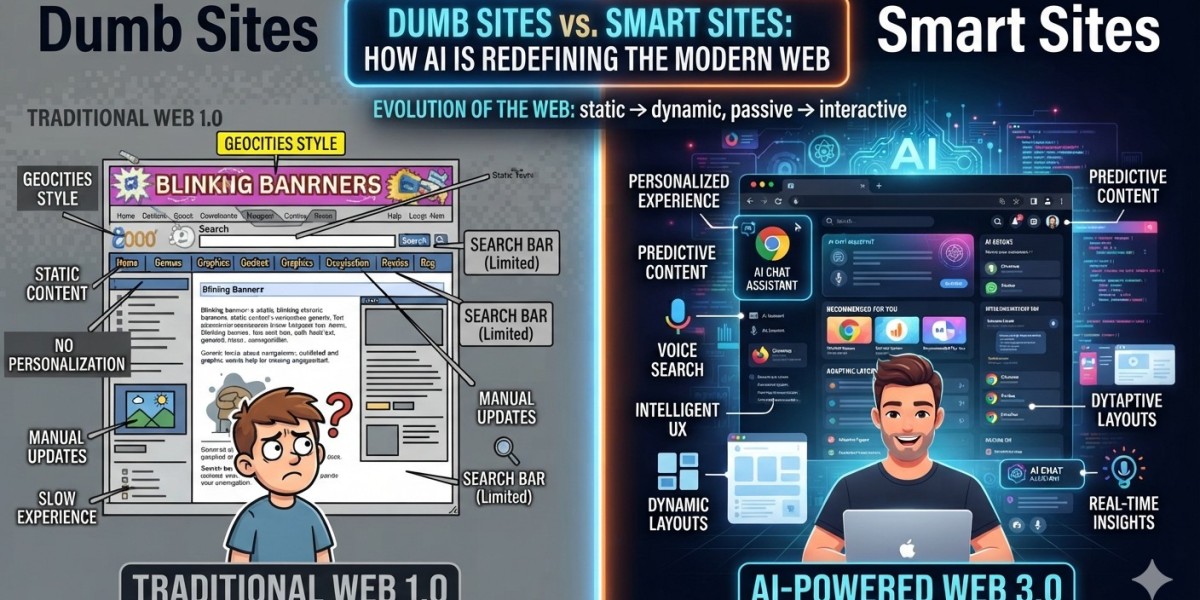
Traditional sites usually share several characteristics:
- The same content is served to every visitor.
- Search is keyword-based, limited, or nonexistent.
- Contact forms create a delay between interest and response.
- FAQs are generic and difficult to browse.
- Product recommendations are simple or absent.
- Content updates require manual writing, editing, publishing, and maintenance.
- Analytics describe what happened but do not actively influence what happens next.
A dumb site can still succeed, particularly if it has strong brand awareness, limited competition, or a straightforward product. A portfolio site for a photographer may not need an AI concierge. A restaurant with one location may only need accurate hours, an appealing menu, and online reservations.
But for businesses with complex services, large content libraries, high-value leads, extensive catalogs, or demanding customers, static behavior increasingly feels outdated. Visitors have grown accustomed to intelligent interfaces from Google, Netflix, Amazon, Spotify, Uber, and ChatGPT. They expect systems to understand natural language, remember context, and make reasonable suggestions.
When a website cannot do any of those things, it can feel less like a destination and more like a filing cabinet.
Smart Sites Do Not Have to Look Like AI
The most interesting AI-enabled websites are not always the ones with a glowing chatbot button in the lower-right corner. In fact, the best applications of AI are often invisible.
A smart site can use AI in the background to make the visible experience faster, more relevant, and easier without forcing the visitor to “talk to a bot.” This distinction matters because consumers are often skeptical of overt AI branding, especially when it feels like a company is using automation to avoid providing real service.
The most effective smart sites combine visible intelligence with invisible intelligence.
AI in the background
Background AI is often operational. It improves the site without demanding attention from the user.
A content-heavy publisher, for example, can use AI to tag articles automatically by subject, person, location, tone, and audience intent. Instead of relying solely on writers or editors to assign categories, the system can create richer internal connections between thousands of older articles. That can improve site search, related-content modules, topical authority, internal linking, and user engagement.
An ecommerce business can use AI to classify product images, detect inconsistent product descriptions, generate missing attributes, flag duplicate listings, predict stockouts, and improve search relevance. A shopper may never see the AI directly, but they experience it when “black leather ankle boots under $150” returns useful results instead of a confusing list of unrelated inventory.
For service businesses, AI can prioritize leads behind the scenes. A visitor who views pricing, reads case studies, returns three times, and submits a detailed inquiry may be more sales-ready than someone who downloads a generic checklist. An AI-assisted lead-scoring system can route that higher-intent prospect to a real salesperson faster.
Other background applications include:
- Detecting broken pages, declining rankings, duplicate content, and technical SEO problems.
- Summarizing customer feedback from forms, reviews, chat logs, and support tickets.
- Personalizing email follow-ups based on viewed pages or stated needs.
- Generating first drafts of metadata, alt text, schema fields, product attributes, and internal links.
- Identifying fraudulent form submissions or suspicious account behavior.
- Forecasting demand, conversion likelihood, churn risk, or customer-service volume.
- Translating and localizing site content while preserving terminology and brand voice.
None of this requires the visitor to type a prompt. But all of it can produce a more useful website.
AI the visitor can see
Visible AI is the more obvious category: conversational interfaces, guided shopping assistants, AI search, recommendation engines, calculators, content generators, interactive planning tools, and personalized dashboards.
A smart real estate site might allow a buyer to ask, “Show me homes within 30 minutes of Midtown Atlanta with a fenced yard, a home office, and under $750,000.” That is much more natural than forcing someone to manually manipulate six filters while guessing which neighborhoods qualify.
A B2B software company might use an AI assistant trained on its product documentation, case studies, implementation guides, and pricing rules. Rather than asking visitors to decode an enterprise product catalog, the assistant can explain which plan fits their company size, what integrations are available, and what implementation typically requires.
A travel site could build a trip planner that understands, “I want a four-day food-focused trip for two, preferably somewhere warm, leaving from Atlanta, with no more than one connection.” The output is no longer a generic destination page. It becomes a tailored starting point.
The key is usefulness. Visible AI should solve a task that would otherwise be annoying, confusing, slow, or expensive.
A chatbot that only repeats the text already visible on the page is not smart. It is a new interface for an old inconvenience.
The Business Case: Better Conversion, Better Service, Better Content
The strongest argument for smart websites is not novelty. It is efficiency.
A well-designed AI system can help a business convert more visitors without requiring a proportionate increase in staff. It can provide immediate answers outside business hours, qualify leads before a human gets involved, direct visitors toward relevant services, and reduce support volume by resolving routine questions.
For an ecommerce brand, the payoff might come from better product discovery. For a healthcare provider, it might be faster routing to the right department. For a media company, it may be higher pageviews and subscription conversion. For a contractor, law firm, financial advisor, or agency, it may be a shorter path from visitor to qualified consultation.
Smart sites can also improve the content operation itself. Publishing teams often have a bottleneck problem: they have ideas, product information, customer questions, and historical content, but not enough time to organize, update, optimize, and distribute it. AI can accelerate research workflows, identify content gaps, surface aging articles, create content briefs, generate structured data, and help writers turn subject-matter expertise into scalable assets.
That does not mean pressing a button and publishing 500 generic blog posts.
The value comes from using AI to increase the output of human judgment, not replace it. A smart content operation still needs a point of view, fact-checking, editorial standards, original reporting or expertise, and a recognizable brand voice. AI can make the machine run faster; it cannot supply credibility by itself.
The Costs Nobody Puts on the Sales Page
AI is often sold as cheap because the marginal cost of generating text, answering a question, or classifying content can be low. That is only part of the equation.
The real cost of a smart site includes strategy, integration, data quality, testing, monitoring, security, and maintenance.
A basic AI feature—such as a hosted chatbot connected to a limited knowledge base—may be relatively inexpensive to launch. Many businesses can begin with a monthly software subscription, initial setup work, and modest API usage. But a genuinely useful AI experience becomes more expensive as it connects to proprietary systems.
A smarter ecommerce assistant may need access to inventory, product information, shipping rules, returns policies, CRM data, and customer accounts. A healthcare system must consider privacy, compliance, and careful guardrails. A financial-services tool may require auditability, disclosures, data controls, and strong limitations around advice. A custom AI search experience may need retrieval systems, embeddings, content ingestion pipelines, evaluation datasets, analytics, and ongoing prompt or model tuning.
Costs typically fall into five categories:
- Design and strategy: determining the user problem worth solving rather than adding AI because competitors have it.
- Implementation: frontend work, backend services, integrations, APIs, data pipelines, authentication, and UX design.
- Model and infrastructure usage: API calls, vector databases, cloud hosting, logging, monitoring, and scaling.
- Content and data preparation: cleaning documentation, standardizing product data, organizing knowledge bases, and removing outdated material.
- Governance and maintenance: testing answers, updating data sources, managing privacy, preventing harmful outputs, and reviewing performance.
A company that spends $500 per month on an AI widget but loses leads because it gives incorrect answers has not saved money. Conversely, a company that spends tens of thousands of dollars creating an intelligent lead-qualification workflow may see strong returns if that system meaningfully improves response time and sales conversion.
The right question is not, “How much does AI cost?”
It is, “What expensive, repetitive, high-friction problem can AI reduce—and how will we measure whether it worked?”
Perception: Helpful Intelligence vs. Cheap Automation
Public perception is the most delicate part of the smart-site equation.
People like convenience. They like answers at midnight, personalized recommendations, faster checkout, accurate search, and websites that do not make them repeat themselves. But they dislike feeling manipulated, surveilled, dismissed, or trapped in an automated maze.
That means the experience needs to be honest.
If a visitor is speaking to an AI assistant, the site should say so. If an answer is based on company documentation rather than a licensed professional, the site should make that clear. If personalization relies on data collection, the business should explain the practice in understandable language and offer meaningful controls where appropriate.
The worst AI website experiences tend to share the same traits:
- The assistant pretends to be human.
- It confidently gives wrong or incomplete answers.
- It blocks access to a human representative.
- It forces users through a scripted interaction.
- It collects personal information without explaining why.
- It creates more work than a menu, phone number, or simple form would have.
A well-designed smart site does the opposite. It gives the user a clear exit path, exposes important sources or policies when relevant, asks only for needed information, and escalates complicated issues to a person.
In other words, the AI should feel like a capable concierge, not a locked door.
The Future Is Not Fully Autonomous
The future web will not divide neatly between sites with AI and sites without it. The real divide will be between websites that use intelligence to reduce friction and websites that remain static while user expectations evolve.
Some businesses will need highly visible AI tools: product advisors, document assistants, interactive estimators, creative generators, and personalized planning interfaces. Others will benefit most from AI working quietly in the background: better search, cleaner data, smarter routing, content maintenance, fraud prevention, and more responsive service.
The best smart sites will not advertise their intelligence at every opportunity. They will simply feel easier to use.
A visitor will find the answer faster. A customer will discover the right product sooner. A prospect will reach the right person without filling out a lifeless form. An editor will update a library of aging content without losing the publication’s voice. A business owner will spend less time sorting leads and more time serving the people most likely to become customers.
That is the practical promise of AI on the web.
Not a website that talks for the sake of talking.
A website that understands enough to help.